Payment setup overview
- Last verified
- Last verified Aug 27, 2026
Payment setup controls how customers pay in the online shop, how staff send payment links, which Stationary POS checkout actions are available, and how invoices and refunds are handled after an order is created.
Use this article before go-live, before enabling a new payment method, or when payment behavior differs between the online shop, a payment link, and the back office.
Before you start
Confirm:
- which payment provider your account uses
- whether you are configuring test credentials or live credentials
- which payment methods should appear in the online shop
- whether staff at a stationary POS should add orders to the connected till receipt, complete them by invoice, or use both paths
- whether payment links are required for back-office orders or invoices
- which legal texts and provider approvals are required before launch
- who is allowed to change payment configuration
Open payment settings
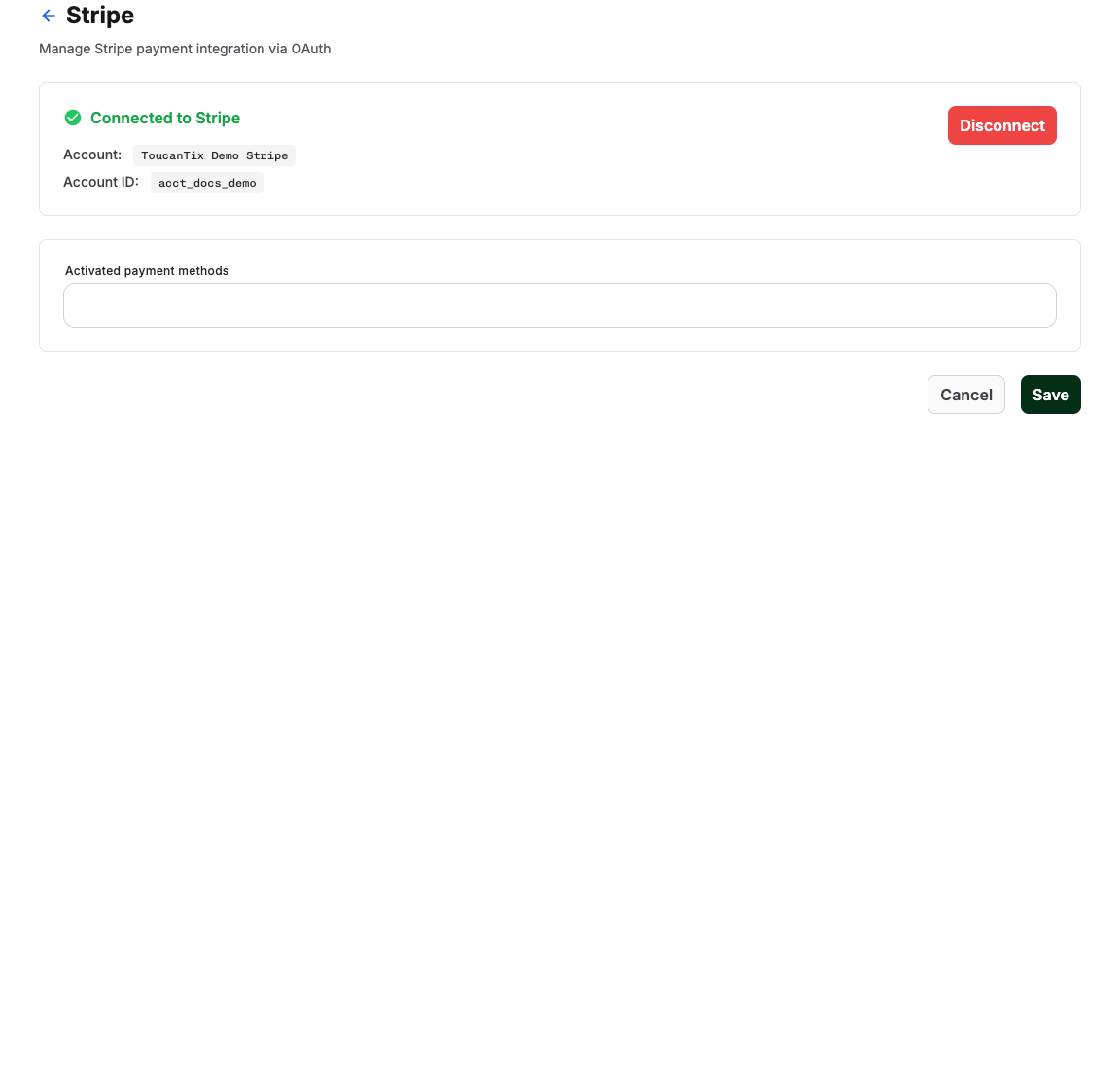
In the back office, open the payment provider settings for your account. Provider pages can include Stripe, PayPal, Saferpay, Authorize.Net, or another configured provider.
Review the stationary POS payment methods first, then the provider connection, mode, credentials, and enabled online payment methods.
Understand the main settings
| Setting | What it controls |
|---|---|
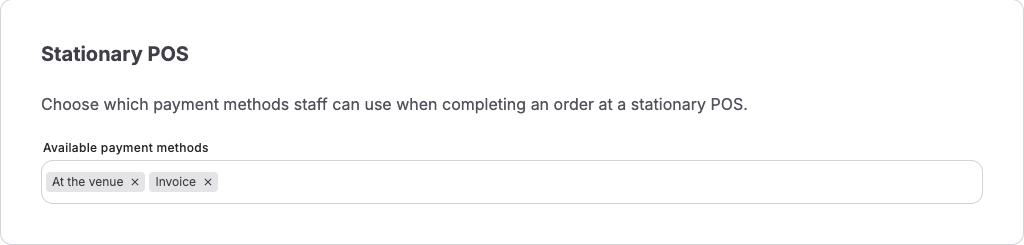
| Stationary POS | Whether staff can use At the venue, Invoice, or both when completing an order at a stationary POS. |
| Live Mode | Whether payment settings use live credentials instead of test credentials. Turn on live mode only after provider approval and a successful test path. |
| Provider connection | Whether KORONA Event can create payment sessions with the provider. A disconnected provider cannot complete online payments. |
| Test credentials | Credentials used for setup and test payments. Test methods should not be advertised to real customers. |
| Live credentials | Credentials used for real customer payments. Keep them restricted to authorized admins. |
| Online payment methods | The methods customers may see, such as card, PayPal, Klarna, Apple Pay, Google Pay, debit, or local methods depending on provider support. |
Choose stationary POS payment methods
In Stationary POS, select only the paths your counter staff are expected to use:
- At the venue shows Add to receipt at the stationary POS. Staff use this when the connected KORONA till handles the receipt and payment.
- Invoice shows Invoice at the stationary POS. Staff use this when the order should be completed with an invoice instead of being added to the till receipt.
Both methods are selected by default. Clear a method when the account's operational process must not use it. The corresponding action is then hidden at the stationary POS, and KORONA Event also rejects attempts to call that checkout path directly.
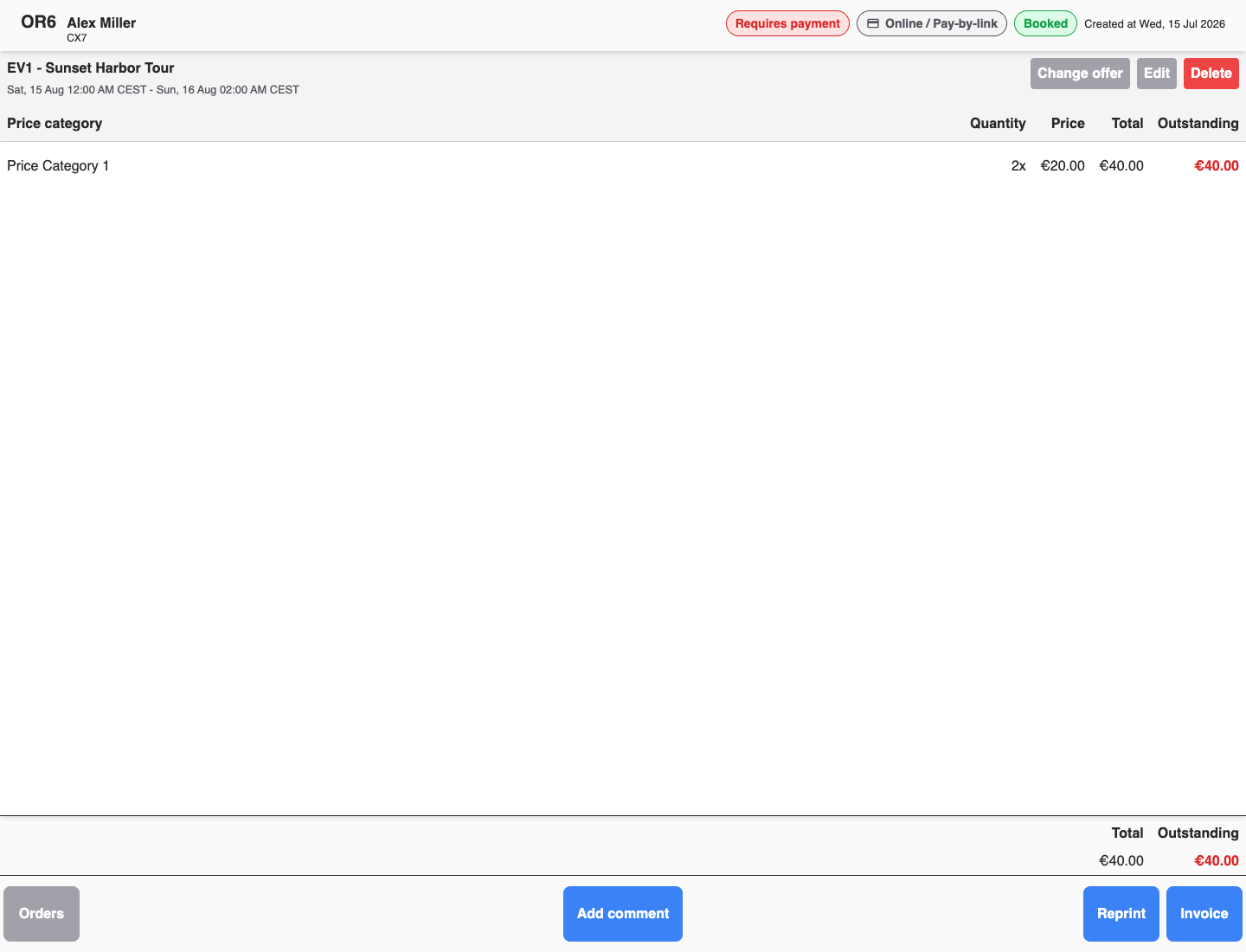
Payment links are not a provider setting: whether staff can send or copy a link depends on order state, invoice state, and open amount, not on a switch on this page.
For the method-by-provider details, use the canonical payment methods reference:
Payment methods
This matrix shows payment methods recognized by each KORONA Event payment-provider integration. Supported does not mean enabled for every merchant: account, country, currency, device, sales flow, provider approval, and feature availability can still restrict a method.
| Option | Stripe | PayPal | Saferpay | Authorize.Net | BlockChyp | Lynck | bLoyal |
|---|---|---|---|---|---|---|---|
| ACSS debit | |||||||
| Account-to-account payment | |||||||
| Affirm | |||||||
| Afterpay / Clearpay | |||||||
| Alipay | |||||||
| Amazon Pay | |||||||
| Apple Pay | |||||||
| Australian BECS debit | |||||||
| Bacs Direct Debit | |||||||
| Bancontact | |||||||
| BLIK | |||||||
| Boleto | |||||||
| Card | |||||||
| Card present | |||||||
| Cash App Pay | |||||||
| Cash on delivery | |||||||
| Direct debit | |||||||
| EPS | |||||||
| FPX | |||||||
| Gift card | |||||||
| Google Pay | |||||||
| GrabPay | |||||||
| iDEAL | |||||||
| Interac present | |||||||
| Provider invoice payment | |||||||
| Itaú | |||||||
| Klarna | |||||||
| Konbini | |||||||
| Link | |||||||
| Masterpass | |||||||
| Mercado Pago | |||||||
| Multibanco | |||||||
| MyBank | |||||||
| OXXO | |||||||
| Paidy | |||||||
| Pay by Bank | |||||||
| PayPal | |||||||
| PayPal Credit | |||||||
| PayPal Pay Later | |||||||
| PayNow | |||||||
| PayU | |||||||
| Pix | |||||||
| Prepaid | |||||||
| Przelewy24 | |||||||
| PromptPay | |||||||
| Revolut Pay | |||||||
| Satispay | |||||||
| SEPA Direct Debit | |||||||
| Swish | |||||||
| Trustly | |||||||
| TWINT | |||||||
| Venmo | |||||||
| WeChat Pay | |||||||
| Wero | |||||||
| Zinia Buy Now Pay Later | |||||||
| Zinia Installments | |||||||
| Zip |
- ✓ Supported
- ◐ Conditional
- ⊘ Not available in checkout
- — Not supported
Stripe: Conditional methods depend on the platform configuration, connected-account capabilities, payment flow, and expanded-payment-method availability.
PayPal: Conditional methods can be exposed through checkout when configured. Not available in checkout means the provider value exists in the integration but is not exposed through KORONA Event's general payment-method selector.
Saferpay: Conditional methods depend on the merchant terminal, currency, environment, and saved provider configuration.
Authorize.Net: The KORONA Event integration currently supports card payments.
BlockChyp: The KORONA Event integration currently supports card payments.
Lynck: Conditional methods depend on the merchant account, live or test configuration, and the checkout flow.
bLoyal: The integration currently exposes gift-card payment.
| Option | What it does | When to use it | Watch out for |
|---|---|---|---|
| ACSS debit | Collects a bank-account debit through Canada's Automated Clearing Settlement System. | When eligible customers should pay from a Canadian bank account. | Settlement is not immediate and availability is conditional. |
| Account-to-account payment | Transfers funds directly between bank accounts through the provider. | When the Saferpay terminal offers account-to-account payment. | Availability depends on the configured terminal and currency. |
| Affirm | Offers an Affirm financing or installment flow. | When eligible customers should finance a purchase with Affirm. | Customer eligibility, currency, country, and account approval apply. |
| Afterpay / Clearpay | Offers a buy-now-pay-later flow provided by Afterpay or Clearpay. | When eligible customers should split or defer payment. | Brand, eligibility, country, currency, and account approval vary. |
| Alipay | Lets customers authorize payment with Alipay. | When Alipay is enabled for the customer and sales flow. | Account, country, currency, and device restrictions can apply. |
| Amazon Pay | Lets customers pay with payment details stored in Amazon Pay. | When Amazon Pay is enabled for the Lynck checkout. | Merchant onboarding and checkout compatibility are required. |
| Apple Pay | Lets customers authorize a wallet payment with Apple Pay. | For eligible customers using a supported Apple device and browser. | Merchant and domain verification may be required. |
| Australian BECS debit | Collects a debit from an eligible Australian bank account. | When customers should pay through the Australian BECS network. | Settlement and dispute behavior differ from card payments. |
| Bacs Direct Debit | Collects a direct debit through the UK Bacs network. | When eligible customers should pay from a UK bank account. | Settlement is delayed and mandate requirements apply. |
| Bancontact | Redirects eligible customers to authorize a Bancontact payment. | When Bancontact is enabled for the customer's checkout. | Country, currency, account, and flow restrictions can apply. |
| BLIK | Lets customers authorize payment using BLIK. | When BLIK is enabled for the customer and checkout. | Country, currency, account, and flow restrictions can apply. |
| Boleto | Creates a boleto that the customer pays through the supported local flow. | When eligible customers need a boleto-based payment option. | Payment confirmation can be delayed; PayPal's catalogued variants are not currently exposed in KORONA Event checkout. |
| Card | Accepts a credit or debit card through the selected provider. | For standard online or terminal card payments. | Accepted card brands, authentication, capture, and device requirements vary by provider. |
| Card present | Accepts an in-person card payment through a supported reader. | For payment flows where the customer's card is physically present. | This is not the same flow as entering card details online. |
| Cash App Pay | Lets customers authorize payment with Cash App Pay. | When Cash App Pay is enabled for the customer's checkout. | Account, country, currency, device, and flow restrictions can apply. |
| Cash on delivery | Records payment as due when the order is delivered. | When the Lynck merchant flow supports collection on delivery. | Operational collection and reconciliation remain outside the online authorization step. |
| Direct debit | Collects payment from a bank account using the provider's general direct-debit flow. | When a configured provider offers direct debit for the customer. | Mandates, settlement times, returns, and eligible countries vary. |
| EPS | Redirects customers to authorize an EPS online-bank payment. | When EPS is enabled for the customer's checkout. | Country, currency, account, and redirect-flow restrictions can apply. |
| FPX | Redirects eligible customers to pay through FPX online banking. | When FPX is enabled for the customer's checkout. | Country, currency, bank, and account restrictions can apply. |
| Gift card | Redeems an eligible gift-card balance through bLoyal. | When bLoyal gift-card payment is configured for the sales flow. | Balance, activation, and partial-payment behavior depend on the gift-card setup. |
| Google Pay | Lets customers authorize a wallet payment with Google Pay. | For eligible customers using a supported device and browser. | Merchant and domain verification may be required. |
| GrabPay | Lets eligible customers authorize payment with GrabPay. | When GrabPay is enabled for the customer's checkout. | Country, currency, account, and device restrictions can apply. |
| iDEAL | Redirects customers to authorize an iDEAL bank payment. | When iDEAL is enabled for the customer's checkout. | Country, currency, account, and redirect-flow restrictions can apply. |
| Interac present | Accepts an in-person Interac payment through a supported reader. | For eligible terminal payments where the customer is present. | Reader, country, account, and in-person flow requirements apply. |
| Provider invoice payment | Lets the payment provider collect payment against an invoice-style method. | When the provider and merchant account explicitly support this payment method. | This is separate from KORONA Event's own invoice workflow and settlement state. |
| Itaú | Represents PayPal's Itaú payment-method integration value. | It is not currently selectable through KORONA Event checkout. | Do not promise availability based only on the provider catalog. |
| Klarna | Offers an eligible Klarna payment or financing flow. | When Klarna is enabled for the customer and checkout. | Products, eligibility, country, currency, and account approval vary. |
| Konbini | Creates a payment flow completed at an eligible convenience store. | When Konbini is enabled for the customer's checkout. | Payment confirmation is delayed and country-specific requirements apply. |
| Link | Lets customers pay with details saved to Stripe Link. | When Link is enabled and available for the customer's device and checkout. | Availability depends on Stripe, the account, and customer eligibility. |
| Masterpass | Represents the Masterpass wallet method in the Saferpay integration. | When the configured Saferpay terminal still offers Masterpass. | Confirm current provider availability before offering this method. |
| Mercado Pago | Lets eligible customers pay through Mercado Pago in the PayPal integration. | When Mercado Pago is enabled for the merchant checkout. | Country, currency, account, and provider restrictions can apply. |
| Multibanco | Represents PayPal's Multibanco payment-method integration value. | It is not currently selectable through KORONA Event checkout. | Do not promise availability based only on the provider catalog. |
| MyBank | Redirects eligible customers to authorize payment through MyBank. | When MyBank is enabled for the merchant checkout. | Country, currency, account, and redirect-flow restrictions can apply. |
| OXXO | Creates a voucher that an eligible customer pays through OXXO. | When OXXO is enabled for the customer's checkout. | Payment confirmation is delayed and voucher expiration applies. |
| Paidy | Represents PayPal's Paidy payment-method integration value. | It is not currently selectable through KORONA Event checkout. | Do not promise availability based only on the provider catalog. |
| Pay by Bank | Lets customers authorize a direct bank payment through Lynck. | When Pay by Bank is enabled for the Lynck merchant checkout. | Bank, account, country, currency, and redirect-flow restrictions can apply. |
| PayPal | Lets customers authorize payment with their PayPal account. | When PayPal is enabled through one of the configured providers. | The exact PayPal experience and eligibility depend on the selected provider. |
| PayPal Credit | Offers eligible customers PayPal's credit product. | When PayPal Credit is enabled and the customer is eligible. | Eligibility, country, currency, and PayPal approval apply. |
| PayPal Pay Later | Represents PayPal's deferred-payment integration value. | It is not currently selectable through KORONA Event checkout. | Do not promise availability based only on the provider catalog. |
| PayNow | Lets eligible customers authorize payment with PayNow. | When PayNow is enabled for the customer's checkout. | Country, currency, account, and device restrictions can apply. |
| PayU | Represents PayPal's PayU payment-method integration value. | It is not currently selectable through KORONA Event checkout. | Do not promise availability based only on the provider catalog. |
| Pix | Lets eligible customers authorize an instant Pix payment. | When Pix is enabled for the customer's checkout. | Country, currency, account, and customer restrictions can apply. |
| Prepaid | Records payment through Lynck's prepaid payment method. | When the Lynck merchant configuration offers prepaid payment. | Confirm how funds are loaded and reconciled before enabling it. |
| Przelewy24 | Redirects eligible customers to authorize an online-bank payment through Przelewy24. | When Przelewy24 is enabled for the customer's checkout. | Provider naming differs and country, currency, account, and redirect restrictions apply. |
| PromptPay | Lets eligible customers authorize payment with PromptPay. | When PromptPay is enabled for the customer's checkout. | Country, currency, account, and device restrictions can apply. |
| Revolut Pay | Lets eligible customers authorize payment with Revolut Pay. | When Revolut Pay is enabled for the customer's checkout. | Country, currency, account, and customer restrictions can apply. |
| Satispay | Represents PayPal's Satispay payment-method integration value. | It is not currently selectable through KORONA Event checkout. | Do not promise availability based only on the provider catalog. |
| SEPA Direct Debit | Collects a euro payment from an eligible bank account under a SEPA mandate. | When SEPA Direct Debit is enabled for the customer and checkout. | Mandate, notification, settlement, return, and dispute requirements apply. |
| Swish | Lets eligible customers authorize payment with Swish. | When Swish is enabled for the customer's checkout. | Country, currency, account, and device restrictions can apply. |
| Trustly | Represents PayPal's Trustly payment-method integration value. | It is not currently selectable through KORONA Event checkout. | Do not promise availability based only on the provider catalog. |
| TWINT | Lets eligible customers authorize payment with TWINT. | When TWINT is enabled for the customer's checkout. | Merchant, country, currency, account, and device restrictions can apply. |
| Venmo | Lets eligible customers authorize payment with Venmo. | When Venmo is enabled for the PayPal merchant checkout. | Country, currency, account, customer, and device restrictions can apply. |
| WeChat Pay | Lets eligible customers authorize payment with WeChat Pay. | When WeChat Pay is exposed by the configured provider. | Stripe support is conditional; PayPal's catalogued value is not currently exposed in KORONA Event checkout. |
| Wero | Lets eligible customers authorize payment with Wero. | When Wero is enabled on the configured Saferpay terminal. | Terminal, country, currency, account, and customer restrictions can apply. |
| Zinia Buy Now Pay Later | Offers eligible customers Zinia's buy-now-pay-later flow through Lynck. | When Zinia Buy Now Pay Later is enabled for the merchant checkout. | Customer eligibility, country, currency, and provider approval apply. |
| Zinia Installments | Offers eligible customers a Zinia installment flow through Lynck. | When Zinia Installments is enabled for the merchant checkout. | Customer eligibility, country, currency, and provider approval apply. |
| Zip | Offers eligible customers a Zip buy-now-pay-later flow. | When Zip is enabled for the customer's checkout. | Customer eligibility, country, currency, and account approval apply. |
Compare payment method support
Use the provider-support matrix to see which payment methods KORONA Event supports with each payment provider. Availability can still depend on your provider account, country, currency, device, browser, and checkout flow.
Payment methods
This matrix shows payment methods recognized by each KORONA Event payment-provider integration. Supported does not mean enabled for every merchant: account, country, currency, device, sales flow, provider approval, and feature availability can still restrict a method.
| Option | Stripe | PayPal | Saferpay | Authorize.Net | BlockChyp | Lynck | bLoyal |
|---|---|---|---|---|---|---|---|
| ACSS debit | |||||||
| Account-to-account payment | |||||||
| Affirm | |||||||
| Afterpay / Clearpay | |||||||
| Alipay | |||||||
| Amazon Pay | |||||||
| Apple Pay | |||||||
| Australian BECS debit | |||||||
| Bacs Direct Debit | |||||||
| Bancontact | |||||||
| BLIK | |||||||
| Boleto | |||||||
| Card | |||||||
| Card present | |||||||
| Cash App Pay | |||||||
| Cash on delivery | |||||||
| Direct debit | |||||||
| EPS | |||||||
| FPX | |||||||
| Gift card | |||||||
| Google Pay | |||||||
| GrabPay | |||||||
| iDEAL | |||||||
| Interac present | |||||||
| Provider invoice payment | |||||||
| Itaú | |||||||
| Klarna | |||||||
| Konbini | |||||||
| Link | |||||||
| Masterpass | |||||||
| Mercado Pago | |||||||
| Multibanco | |||||||
| MyBank | |||||||
| OXXO | |||||||
| Paidy | |||||||
| Pay by Bank | |||||||
| PayPal | |||||||
| PayPal Credit | |||||||
| PayPal Pay Later | |||||||
| PayNow | |||||||
| PayU | |||||||
| Pix | |||||||
| Prepaid | |||||||
| Przelewy24 | |||||||
| PromptPay | |||||||
| Revolut Pay | |||||||
| Satispay | |||||||
| SEPA Direct Debit | |||||||
| Swish | |||||||
| Trustly | |||||||
| TWINT | |||||||
| Venmo | |||||||
| WeChat Pay | |||||||
| Wero | |||||||
| Zinia Buy Now Pay Later | |||||||
| Zinia Installments | |||||||
| Zip |
- ✓ Supported
- ◐ Conditional
- ⊘ Not available in checkout
- — Not supported
Stripe: Conditional methods depend on the platform configuration, connected-account capabilities, payment flow, and expanded-payment-method availability.
PayPal: Conditional methods can be exposed through checkout when configured. Not available in checkout means the provider value exists in the integration but is not exposed through KORONA Event's general payment-method selector.
Saferpay: Conditional methods depend on the merchant terminal, currency, environment, and saved provider configuration.
Authorize.Net: The KORONA Event integration currently supports card payments.
BlockChyp: The KORONA Event integration currently supports card payments.
Lynck: Conditional methods depend on the merchant account, live or test configuration, and the checkout flow.
bLoyal: The integration currently exposes gift-card payment.
| Option | What it does | When to use it | Watch out for |
|---|---|---|---|
| ACSS debit | Collects a bank-account debit through Canada's Automated Clearing Settlement System. | When eligible customers should pay from a Canadian bank account. | Settlement is not immediate and availability is conditional. |
| Account-to-account payment | Transfers funds directly between bank accounts through the provider. | When the Saferpay terminal offers account-to-account payment. | Availability depends on the configured terminal and currency. |
| Affirm | Offers an Affirm financing or installment flow. | When eligible customers should finance a purchase with Affirm. | Customer eligibility, currency, country, and account approval apply. |
| Afterpay / Clearpay | Offers a buy-now-pay-later flow provided by Afterpay or Clearpay. | When eligible customers should split or defer payment. | Brand, eligibility, country, currency, and account approval vary. |
| Alipay | Lets customers authorize payment with Alipay. | When Alipay is enabled for the customer and sales flow. | Account, country, currency, and device restrictions can apply. |
| Amazon Pay | Lets customers pay with payment details stored in Amazon Pay. | When Amazon Pay is enabled for the Lynck checkout. | Merchant onboarding and checkout compatibility are required. |
| Apple Pay | Lets customers authorize a wallet payment with Apple Pay. | For eligible customers using a supported Apple device and browser. | Merchant and domain verification may be required. |
| Australian BECS debit | Collects a debit from an eligible Australian bank account. | When customers should pay through the Australian BECS network. | Settlement and dispute behavior differ from card payments. |
| Bacs Direct Debit | Collects a direct debit through the UK Bacs network. | When eligible customers should pay from a UK bank account. | Settlement is delayed and mandate requirements apply. |
| Bancontact | Redirects eligible customers to authorize a Bancontact payment. | When Bancontact is enabled for the customer's checkout. | Country, currency, account, and flow restrictions can apply. |
| BLIK | Lets customers authorize payment using BLIK. | When BLIK is enabled for the customer and checkout. | Country, currency, account, and flow restrictions can apply. |
| Boleto | Creates a boleto that the customer pays through the supported local flow. | When eligible customers need a boleto-based payment option. | Payment confirmation can be delayed; PayPal's catalogued variants are not currently exposed in KORONA Event checkout. |
| Card | Accepts a credit or debit card through the selected provider. | For standard online or terminal card payments. | Accepted card brands, authentication, capture, and device requirements vary by provider. |
| Card present | Accepts an in-person card payment through a supported reader. | For payment flows where the customer's card is physically present. | This is not the same flow as entering card details online. |
| Cash App Pay | Lets customers authorize payment with Cash App Pay. | When Cash App Pay is enabled for the customer's checkout. | Account, country, currency, device, and flow restrictions can apply. |
| Cash on delivery | Records payment as due when the order is delivered. | When the Lynck merchant flow supports collection on delivery. | Operational collection and reconciliation remain outside the online authorization step. |
| Direct debit | Collects payment from a bank account using the provider's general direct-debit flow. | When a configured provider offers direct debit for the customer. | Mandates, settlement times, returns, and eligible countries vary. |
| EPS | Redirects customers to authorize an EPS online-bank payment. | When EPS is enabled for the customer's checkout. | Country, currency, account, and redirect-flow restrictions can apply. |
| FPX | Redirects eligible customers to pay through FPX online banking. | When FPX is enabled for the customer's checkout. | Country, currency, bank, and account restrictions can apply. |
| Gift card | Redeems an eligible gift-card balance through bLoyal. | When bLoyal gift-card payment is configured for the sales flow. | Balance, activation, and partial-payment behavior depend on the gift-card setup. |
| Google Pay | Lets customers authorize a wallet payment with Google Pay. | For eligible customers using a supported device and browser. | Merchant and domain verification may be required. |
| GrabPay | Lets eligible customers authorize payment with GrabPay. | When GrabPay is enabled for the customer's checkout. | Country, currency, account, and device restrictions can apply. |
| iDEAL | Redirects customers to authorize an iDEAL bank payment. | When iDEAL is enabled for the customer's checkout. | Country, currency, account, and redirect-flow restrictions can apply. |
| Interac present | Accepts an in-person Interac payment through a supported reader. | For eligible terminal payments where the customer is present. | Reader, country, account, and in-person flow requirements apply. |
| Provider invoice payment | Lets the payment provider collect payment against an invoice-style method. | When the provider and merchant account explicitly support this payment method. | This is separate from KORONA Event's own invoice workflow and settlement state. |
| Itaú | Represents PayPal's Itaú payment-method integration value. | It is not currently selectable through KORONA Event checkout. | Do not promise availability based only on the provider catalog. |
| Klarna | Offers an eligible Klarna payment or financing flow. | When Klarna is enabled for the customer and checkout. | Products, eligibility, country, currency, and account approval vary. |
| Konbini | Creates a payment flow completed at an eligible convenience store. | When Konbini is enabled for the customer's checkout. | Payment confirmation is delayed and country-specific requirements apply. |
| Link | Lets customers pay with details saved to Stripe Link. | When Link is enabled and available for the customer's device and checkout. | Availability depends on Stripe, the account, and customer eligibility. |
| Masterpass | Represents the Masterpass wallet method in the Saferpay integration. | When the configured Saferpay terminal still offers Masterpass. | Confirm current provider availability before offering this method. |
| Mercado Pago | Lets eligible customers pay through Mercado Pago in the PayPal integration. | When Mercado Pago is enabled for the merchant checkout. | Country, currency, account, and provider restrictions can apply. |
| Multibanco | Represents PayPal's Multibanco payment-method integration value. | It is not currently selectable through KORONA Event checkout. | Do not promise availability based only on the provider catalog. |
| MyBank | Redirects eligible customers to authorize payment through MyBank. | When MyBank is enabled for the merchant checkout. | Country, currency, account, and redirect-flow restrictions can apply. |
| OXXO | Creates a voucher that an eligible customer pays through OXXO. | When OXXO is enabled for the customer's checkout. | Payment confirmation is delayed and voucher expiration applies. |
| Paidy | Represents PayPal's Paidy payment-method integration value. | It is not currently selectable through KORONA Event checkout. | Do not promise availability based only on the provider catalog. |
| Pay by Bank | Lets customers authorize a direct bank payment through Lynck. | When Pay by Bank is enabled for the Lynck merchant checkout. | Bank, account, country, currency, and redirect-flow restrictions can apply. |
| PayPal | Lets customers authorize payment with their PayPal account. | When PayPal is enabled through one of the configured providers. | The exact PayPal experience and eligibility depend on the selected provider. |
| PayPal Credit | Offers eligible customers PayPal's credit product. | When PayPal Credit is enabled and the customer is eligible. | Eligibility, country, currency, and PayPal approval apply. |
| PayPal Pay Later | Represents PayPal's deferred-payment integration value. | It is not currently selectable through KORONA Event checkout. | Do not promise availability based only on the provider catalog. |
| PayNow | Lets eligible customers authorize payment with PayNow. | When PayNow is enabled for the customer's checkout. | Country, currency, account, and device restrictions can apply. |
| PayU | Represents PayPal's PayU payment-method integration value. | It is not currently selectable through KORONA Event checkout. | Do not promise availability based only on the provider catalog. |
| Pix | Lets eligible customers authorize an instant Pix payment. | When Pix is enabled for the customer's checkout. | Country, currency, account, and customer restrictions can apply. |
| Prepaid | Records payment through Lynck's prepaid payment method. | When the Lynck merchant configuration offers prepaid payment. | Confirm how funds are loaded and reconciled before enabling it. |
| Przelewy24 | Redirects eligible customers to authorize an online-bank payment through Przelewy24. | When Przelewy24 is enabled for the customer's checkout. | Provider naming differs and country, currency, account, and redirect restrictions apply. |
| PromptPay | Lets eligible customers authorize payment with PromptPay. | When PromptPay is enabled for the customer's checkout. | Country, currency, account, and device restrictions can apply. |
| Revolut Pay | Lets eligible customers authorize payment with Revolut Pay. | When Revolut Pay is enabled for the customer's checkout. | Country, currency, account, and customer restrictions can apply. |
| Satispay | Represents PayPal's Satispay payment-method integration value. | It is not currently selectable through KORONA Event checkout. | Do not promise availability based only on the provider catalog. |
| SEPA Direct Debit | Collects a euro payment from an eligible bank account under a SEPA mandate. | When SEPA Direct Debit is enabled for the customer and checkout. | Mandate, notification, settlement, return, and dispute requirements apply. |
| Swish | Lets eligible customers authorize payment with Swish. | When Swish is enabled for the customer's checkout. | Country, currency, account, and device restrictions can apply. |
| Trustly | Represents PayPal's Trustly payment-method integration value. | It is not currently selectable through KORONA Event checkout. | Do not promise availability based only on the provider catalog. |
| TWINT | Lets eligible customers authorize payment with TWINT. | When TWINT is enabled for the customer's checkout. | Merchant, country, currency, account, and device restrictions can apply. |
| Venmo | Lets eligible customers authorize payment with Venmo. | When Venmo is enabled for the PayPal merchant checkout. | Country, currency, account, customer, and device restrictions can apply. |
| WeChat Pay | Lets eligible customers authorize payment with WeChat Pay. | When WeChat Pay is exposed by the configured provider. | Stripe support is conditional; PayPal's catalogued value is not currently exposed in KORONA Event checkout. |
| Wero | Lets eligible customers authorize payment with Wero. | When Wero is enabled on the configured Saferpay terminal. | Terminal, country, currency, account, and customer restrictions can apply. |
| Zinia Buy Now Pay Later | Offers eligible customers Zinia's buy-now-pay-later flow through Lynck. | When Zinia Buy Now Pay Later is enabled for the merchant checkout. | Customer eligibility, country, currency, and provider approval apply. |
| Zinia Installments | Offers eligible customers a Zinia installment flow through Lynck. | When Zinia Installments is enabled for the merchant checkout. | Customer eligibility, country, currency, and provider approval apply. |
| Zip | Offers eligible customers a Zip buy-now-pay-later flow. | When Zip is enabled for the customer's checkout. | Customer eligibility, country, currency, and account approval apply. |
Check legal and provider readiness
Before accepting real payments, confirm:
- shop terms, privacy policy, imprint, and withdrawal information are present where required
- provider onboarding and account approval are complete
- live credentials are saved
- wallet methods have completed domain or merchant verification when required
- payment-link support has been reviewed for the intended methods
- refund responsibilities are clear for back-office and POS staff
Complete payment setup
- Connect the approved provider account.
- Select live mode when the shop is ready to accept real payments.
- Select the receipt and invoice paths staff may use under Stationary POS.
- Enable only the online payment methods approved for the account's countries, currencies, domains, and customer flows.
- Configure payment links only for supported providers and methods.
- Agree which team owns refunds, chargebacks, provider reconciliation, and payment exceptions.
Check PayPal webhook delivery
Use this check when PayPal reports repeated webhook failures or support asks you to verify the webhook setup.
Customers do not need to create, edit, or delete PayPal webhooks in the PayPal Developer Dashboard. KORONA Event technical staff manage the account-specific webhook through PayPal's API by using the credentials already stored for the account.
- Identify the KORONA Event account and whether the issue affects test or live payments.
- Contact KORONA Event support and ask for a read-only webhook inventory for that exact account and mode.
- Support confirms that one healthy webhook points to the account-specific KORONA Event URL and that no active webhook still uses a retired shared KORONA Event URL.
Before contacting support, collect:
- the KORONA Event account and whether the issue affects test or live payments
- the time of the latest failed delivery and its PayPal event ID
The expected result is exactly one healthy stored/current v1 webhook for the selected app and mode, with no active webhook using either retired shared KORONA Event URL.
Expected result
The approved stationary POS checkout paths, provider, live mode, online payment methods, payment-link support, and operational ownership are configured for the account.
Troubleshooting
| Problem | What to check |
|---|---|
| Payment methods are missing | Provider connection, Live Mode, enabled methods, country/device eligibility, wallet verification, and whether the flow is checkout or payment link. |
| A receipt or invoice action is missing at the stationary POS | The selected methods under Stationary POS. The action appears only when that method is enabled for the account. |
| Wallet buttons do not appear | Apple Pay or Google Pay approval, domain verification, browser support, device wallet setup, and provider-side settings. |
| Payment link cannot be created | Order or invoice state, open amount, provider setup, expired or canceled order, and whether payment links are supported for the payment method. |
| Customer paid but no ticket was sent | Payment state, order state, ticket generation, email delivery, and provider dashboard transaction state. |
| Refund state looks wrong | Check whether the refund happened in KORONA Event, POS, or provider dashboard, and whether the order still shows a refund-needed state. |
